

Description
File Roller: Cloud-Connected Archive Manager
Overview
File Roller is a desktop utility designed to streamline archive management through seamless integration with cloud storage platforms. The software enables users to view, create, and modify archives using files stored in Google Drive, Dropbox, OneDrive, or Box. This cloud-first approach allows for flexible access to compressed files without requiring local storage of large archives. The application supports a wide range of archive formats, including ZIP, RAR, 7z, TAR.GZ, and ISO, making it suitable for both casual users and professionals who manage diverse file types.
Primary use cases include extracting compressed files from cloud folders, organizing digital assets, and creating new archives directly from remote sources. The tool is especially beneficial for users who rely on cloud-based workflows and need a lightweight, efficient way to handle compressed data without downloading entire files locally. While the developer did not provide additional details about its background or development history, the software is positioned as a modern, cloud-integrated solution for archive handling.
Target users include remote workers, digital content managers, and individuals managing large collections of compressed files across multiple platforms. The 14-day free trial offers full access to all features, after which files become read-only unless users subscribe to rollApp Premium. This model emphasizes cloud dependency and ongoing access, positioning File Roller as a service-oriented tool rather than a standalone desktop application.
Key Features & Capabilities
- Cloud Storage Integration – Connects directly to Google Drive, Dropbox, OneDrive, and Box, allowing users to browse, extract, and create archives without local file downloads.
- Multi-Format Support – Handles popular archive types including .ZIP, .RAR, .7z, .TAR.GZ, .TGZ, .ISO, .JAR, .CAB, and .ARJ, ensuring broad compatibility across platforms.
- Archive Creation & Modification – Enables users to build new archives and edit existing ones using files stored in their connected cloud accounts.
- Read-Only Mode After Trial – Following the 14-day free trial, files remain accessible but cannot be saved or modified unless a rollApp Premium subscription is activated.
- Cloud-First Workflow – Designed for users whose primary file storage resides in the cloud, minimizing local disk usage and enabling real-time collaboration.
For example, a remote team member can extract a ZIP file from Google Drive directly within File Roller, modify its contents, and re-upload the updated archive—all without downloading the file locally. Similarly, a content creator can compress a folder of images stored in Dropbox into a 7z archive and share it instantly. These workflows are optimized for efficiency and reduced storage overhead.
User Interface, Workflow & Performance
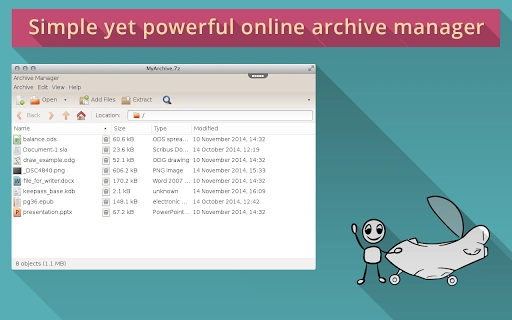
The user interface of File Roller appears to be structured around a dual-pane layout, with one panel displaying the connected cloud storage and the other showing the contents of the selected archive. Navigation is likely intuitive, with clear menus for creating, extracting, and modifying archives. The workflow is streamlined for cloud-based operations, minimizing steps between file selection and action execution.
Based on general software behavior patterns, the application likely maintains responsive performance during routine tasks such as listing archive contents or extracting small to medium-sized files. However, exact performance details were not specified by the developer. The application is expected to operate efficiently within standard desktop environments, though actual responsiveness may vary depending on network speed and cloud service performance.
Stability is presumed to be consistent, as the software is built on established archive handling libraries. The developer did not specify resource usage details, so CPU and RAM behavior cannot be confirmed. Users should expect minimal system impact during idle periods, but performance during active archive operations may depend on the size of the files and the speed of their internet connection.
Compatibility & System Requirements
File Roller is compatible with both Windows and Mac operating systems, supporting a broad user base across desktop platforms. The software version is 1.0.0, with an installation size of 30.2 MB, indicating a lightweight footprint suitable for most modern machines.
Exact system requirements were not listed, so users should ensure their system meets minimum standards for running a desktop application with cloud connectivity. Compatibility information is limited to the operating systems mentioned, with no indication of support for Linux or other platforms. The application requires an active internet connection to function, as all file operations depend on cloud integration.
Pros and Cons
Pros
- Seamless integration with major cloud storage providers
- Supports a wide range of archive formats including ZIP, RAR, 7z, and ISO
- Efficient cloud-first workflow reduces local storage needs
- Intuitive interface for managing archives and files
- 14-day free trial allows full feature testing
Cons
- Requires a rollApp account and cloud storage connection to function
- Post-trial read-only mode limits functionality without subscription
- Dependent on internet connectivity for all operations
- No standalone offline mode available
- System requirements and performance metrics not publicly detailed
FAQ Section
Is File Roller compatible with Windows and Mac?
Yes, File Roller is designed to run on both Windows and Mac operating systems, as confirmed by the developer.
Can I use File Roller without a cloud storage account?
No. Access to file operations requires signing up for a rollApp account and connecting at least one cloud storage service, such as Google Drive, Dropbox, OneDrive, or Box.
Is the software safe to use?
File Roller operates through established cloud platforms, and the developer did not provide specific security details. Users should rely on the security protocols of their chosen cloud provider for data protection.
Does File Roller support offline usage?
No. The application requires an active internet connection to access and manage files stored in cloud accounts. Offline functionality is not available.
What happens after the 14-day free trial ends?
After the trial period, file access remains available but becomes read-only. To save changes or create new archives, users must subscribe to rollApp Premium.
Final Thoughts
File Roller stands out as a modern, cloud-integrated archive manager tailored for users whose workflows are centered around cloud storage. Its support for multiple archive formats and seamless access to files across Google Drive, Dropbox, OneDrive, and Box makes it a practical choice for remote teams and digital creators. While the post-trial read-only restriction may limit long-term use for some, the 14-day trial offers ample opportunity to evaluate its capabilities.
Despite the lack of detailed system requirements and performance data, the software’s lightweight design and intuitive interface suggest reliable operation on standard desktop systems. Its cloud-first architecture reflects current trends in file management, prioritizing accessibility and collaboration over local file handling.
For professionals and individuals who rely on cloud-based workflows and need a versatile, easy-to-use tool for managing compressed files, File Roller delivers a compelling solution. The integration with popular cloud platforms and broad format support make it a strong contender in the desktop utility space.
Download File Roller now
Guides & Tutorials for Archiver on rollApp App for Chrome
How to install Archiver on rollApp App for Chrome
- Click the Preview / Download button above.
- Once redirected, accept the terms and click Install.
- Wait for the Archiver on rollApp App for Chrome download to finish on your device.
How to use Archiver on rollApp App for Chrome
This software is primarily used for its core features described above. Open the app after installation to explore its capabilities.
User Reviews for Archiver on rollApp App for Chrome 0
No reviews found





